Guitar Improv: Building the Tool I Kept Almost Finding
Dated
practical
I got tired of juggling YouTube, Moises and Songsterr to practise improvising, so I built my own on AWS. Here's the serverless architecture and what it actually costs.

I got tired of juggling YouTube, Moises and Songsterr to practise improvising, so I built my own on AWS. Here's the serverless architecture and what it actually costs.
Four browser tabs, three subscriptions, and one serverless stack that costs less than the secrets it stores.
I have, at various points, had a YouTube backing track, Moises and Songsterr open at the same time. On a laptop. Next to a guitar I was supposed to be playing.
Sound familiar ? Good, you're my people. If it doesn't, you either play better than me or you've made peace with tab-switching, and I'm jealous of both.

This is the story of how I stopped juggling and built the thing I'd wanted for years, on AWS, serverless, for roughly the price of drinking the dregs out of a starbucks coffee cup found sitting on a bench outside argos (cos lets face it coffee is damn expensive these days). It's mostly about the architecture and the cost, because that's the bit I can actually defend. The guitar playing is another matter.
Try it (Here's on i made eariler): improv.scarr.cloud. The demo loops need no login.
Every tool I used did part of the job well and then stopped, or hidden behind a subscription i didnt want to pay for.
YouTube has a backing track for almost everything, some have chord maps but others... i have no idea what chords are coming next, and definitely no idea what I should be playing over them. Moises will pull the guitar out of a song and let me slow things down, which is brilliant, but it won't show me where to land on the neck when the chord changes. Songsterr is great for learning a song, less so for improvising over one.
What I actually wanted was simple to say and annoying to find:
Nothing did all five. So each time I'd use one tool, hit the wall, and open another. Eventually I ran out of patience, which in my experience is the real mother of invention.
guitar improv is a single-page app. You play along to a track and the fretboard shows the scale, rings the chord tones, and counts down to the next change. You can upload your own track and have it analysed into a chord chart and beat map, and optionally get a backing mix with the lead, rhythm or all guitar removed.
The analysis and stem separation come from Music.ai, the developer API from the Moises folks. Yes, I paid for the API of the thing I was trying to replace. I'm choosing to call that "integration" rather than "irony".
It started in late May as a single React file with a chord parser and a fretboard. It's now a proper multi-user platform (of two, me and admin me) with auth, an upload pipeline, an editor for fixing wrong chord charts, and an admin side. Claude Code did a lot of the typing. I did the arguing, which you'll see in the decisions below.
Here's what the landing page looks like. The fretboard under the chord cards is the whole point: the scale in grey, the chord tones in colour, and the notes that are in both ringed in orange. Press play and it follows the track.
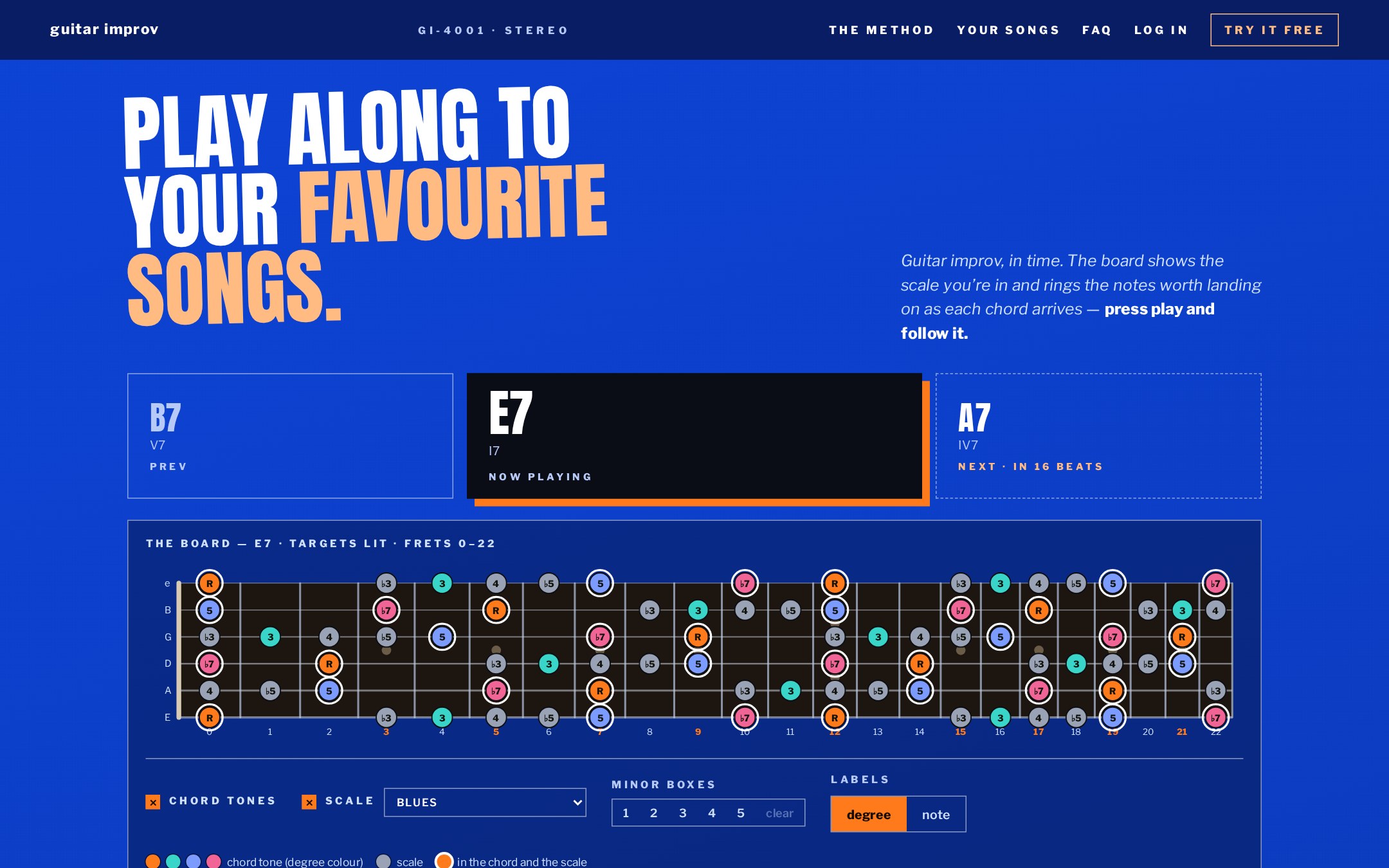 The current chord (E7), the previous one, the next one and a countdown in beats. Then the fretboard doing the thinking for me.
Scroll down and there are five free loops with no account needed (blues, slow blues, classic rock, thrash and nu-metal). "Side B" is where your own MP3s go, which is invite-only for now.
 Side A is the demo. Side B is the bit that needs the entire backend below.
The five demo tracks are royalty free, on purpose. I didn't want the public landing page to be the first place I got a copyright complaint. They all come from Pixabay under the Pixabay Content License, which allows this kind of use. I only stream them inside the player, never offer them as downloads, and credit each artist in the landing page footer. Each clip is trimmed to 25 to 32 seconds and cut on a bar line using the beat map from Music.ai, so the loop doesn't stumble.
The bit this whole blog post is about, promise its not a sales pitch !
Serverless, scale-to-zero, nothing that bills me for existing. Deployed into the existing workload account of my landing zone rather than a new account, because a new account is a new bill.
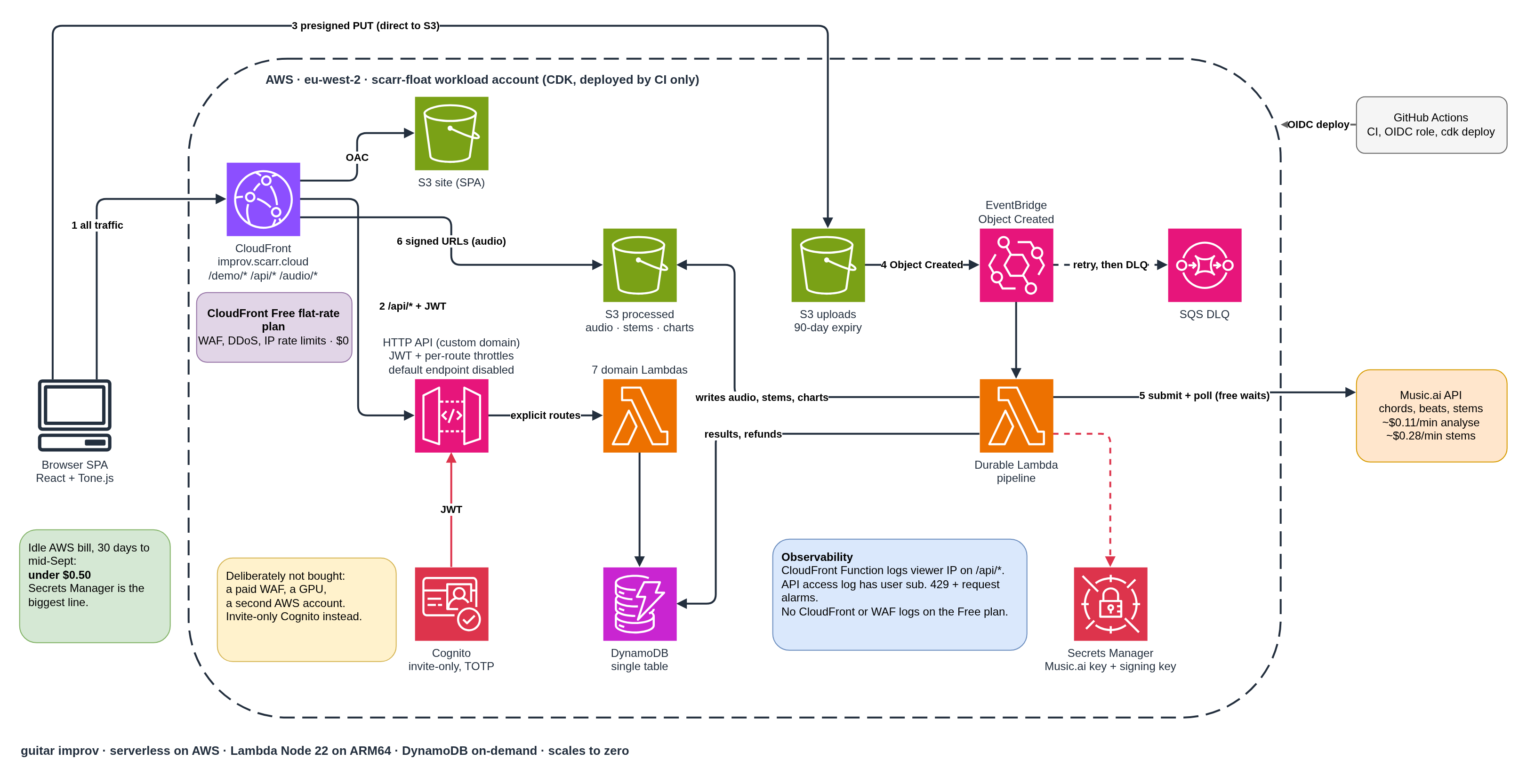
The numbers on the arrows are the order things happen in. Everything the browser does goes through CloudFront (1): the app, the demo loops, the API and the audio. API calls go to /api/* with a JWT (2), uploads go straight to S3 with a presigned URL (3), which fires EventBridge (4), which starts the pipeline that talks to Music.ai (5). Audio comes back to the browser through CloudFront with signed URLs (6).
The purple box at the top is the newest addition, and it changed the shape of the diagram. The blue box at the bottom is what that addition cost me in visibility. Both get their own section below.
Same picture in Mermaid, if you'd rather paste it than admire mine:
The pieces, and why each one is there:
| Piece | What it does | Why this and not something else |
|---|---|---|
| CloudFront + S3 (OAC) | Serves the SPA, the demo loops, the audio and now the API | Private buckets, HTTPS, HSTS, price class 100 because my users (me) are in Europe and I'm cheap. On the Free flat-rate plan, so WAF and rate limiting come with it |
| Cognito | Invite-only auth, TOTP required | Admin-create only, no public signup. Smallest attack surface for a beta of me and well.. me |
| HTTP API + JWT authorizer | The API front door | Cheaper and simpler than REST API. Every route is defined explicitly, no {proxy+}, with tighter throttles on the expensive ones. Custom domain, default endpoint disabled |
| 8 Lambdas (Node 22, ARM64) | tracks, credits, uploads, editor, admin, purge, reaper, pipeline | One runtime across the lot. Coarse Lambdas per domain, not one per route, with least-privilege IAM on each |
| DynamoDB | Single table, on-demand, PITR on | Access patterns are known and small. Idle cost is basically zero |
| S3 upload + processed buckets | Raw uploads expire at 90 days | Presigned PUT straight from the browser, so no file ever passes through a Lambda |
| Lambda durable functions | The Music.ai pipeline | Covered below |
| CloudFront signed URLs | Audio playback | Key in Secrets Manager. Tracks are private by default |
Two decisions are worth pausing on, because they're the ones people ask about (who am i kidding, no one is asking me about them, but i'm gonna tell you anyway).
For a while this had no WAF, and I was fine with that. Nobody can sign up, every API route needs a JWT, and the worst a stranger could do is annoy me. My own Well-Architected review disagreed, politely, with a MEDIUM finding on the CloudFront distribution. Fair. The trouble was the price: a WAF at roughly $5 to $8 a month is more than the rest of the stack put together.
Then I found the CloudFront flat-rate plans. The Free one is $0 (or converted to British sterling at todays exchange rate... still £0) a month, includes AWS WAF, DDoS protection and IP rate limiting, and has no overage charges. The allowance is 1M requests and 100 GB a month, and blocked requests don't count against it. For a site with a handful of users (yeah, just me but still going to write this like its a real thing alright !), that's plenty.
Is a free WAF too good to be true ? Slightly. The Free tier is the cut-down feature set (IP rate limiting and geo blocking, with the bot management and CAPTCHA stuff reserved for the paid tiers), but for "stop something hammering my demo loops" it does exactly the job.
So what was actually exposed ? Not my data, every route needs a login and the buckets are private. What a stranger could do is waste my money or get in the way of my own use. Four ways, simplest first:
There is a catch, and it's worth being straight about. The Free plan doesn't include standard access logs or WAF request logs. Those start on the $15 a month Pro plan. So I can see that traffic spiked, but not who caused it, and I can't see what the rate limiter blocked, which means I'm tuning it blind. The API is where the traffic that costs real money lives, so that's the bit I wanted to keep visibility on. The obvious answer was to log the client IP in the API Gateway access log. It can't. HTTP API access logs have no variable for a request header, and behind CloudFront the source IP is just an edge address, so the real viewer IP never shows up.
The workaround is a tiny CloudFront Function on /api/* that logs the viewer IP, method and path. No query string, no headers. The logs go to a log group with 14 day retention, because IPs are personal data and two weeks is plenty to work out what happened, and I saved a Logs Insights query for top IPs by route. The API access log also gains the JWT subject, so authenticated callers are identifiable even without an IP. On top of that sit the alarms on 429s and request counts. It's best effort rather than an audit trail (function logs can drop, and they're billed separately, in pennies), but it tells me something is wrong quickly and usually who.
For everything else (the app, the demo loops, audio) there's nothing per request. The WAF does keep a sample of recent requests and a security dashboard, which is enough to see what's being blocked, just not to go digging next week.
Is that the right trade ? For a hobby app with invite-only auth, yes. $0 with no request logs beats $0 with no protection at all. If this ever becomes more than a hobby, the move is either pay-as-you-go CloudFront with my own web ACL and logging to S3 (roughly $6 to $7 a month) or the Pro plan. Until then, free is better than not free.
Total cost is roughly nothing. It saves about $6 a month compared with the paid WAF, and the alarms and function logs add around 30 cents. The interesting part is that the security story got better and the architecture got simpler, because one front door is easier to reason about than two.
A few rules of the Free plan are worth knowing before you copy this. You get 5 cache behaviours (I use exactly 5) and managed policies only, so no custom cache or response header policies. Once you're subscribed the web ACL can't be detached, and deleting the subscription from your template quietly puts the distribution back on pay-as-you-go. Neither is a dealbreaker, but I'd rather you read it here than find out mid-deploy.
Yes, I know. I'm the person who says "boring and correct" and reaches for Terraform. But this workload deploys into an estate that's already CDK - because you know shits and giggles, and matching the estate beat matching my habits. It's a deliberate exception, scoped to this repo, and I'm at peace with it. Mostly.
Spoiler: More on that estate to come in a future post... maybe.... if i remember... and ever finish it.
The processing flow is: upload lands in S3, EventBridge fires, a Lambda submits a job to Music.ai, then waits. Minutes. Sometimes longer for stems. Then it polls, maps the result, saves it, and refunds a credit if anything went wrong.
That wait is the awkward bit. Lambda durable functions solve it neatly, because waitForCondition suspends the function between polls and you aren't billed compute while it sleeps:
const final = await context.waitForCondition<PollState>(
  `${prefix}poll`,
  async (state) => {
    const mai = await pollMusicAi(state.musicAiJobId);
    return { musicAiJobId: state.musicAiJobId, status: mai.status };
  },
  {
    initialState: { musicAiJobId, status: 'QUEUED' },
    waitStrategy: createWaitStrategy<PollState>({
      initialDelay: { seconds: 5 },
      maxDelay: { seconds: 30 },
      backoffRate: 1.5,
      maxAttempts: 200,
      timeoutSeconds: 60 * 60, // 1 h ceiling on the whole poll
      shouldContinuePolling: (s) => s.status === 'QUEUED' || s.status === 'STARTED',
    }),
  },
);
Was this chosen to save money ? No. At tens of jobs a month, Step Functions Standard and durable functions both cost pennies. I chose it because the orchestrator stays plain TypeScript (no ASL rewrite), the waits are free, it's CDK-native, and, honestly, I wanted to try it out. Step Functions Standard is documented as a like-for-like fallback with no data model change if I get bored or it bites me.
Deploys are CI-only through GitHub Actions and OIDC. Merge to main, it deploys. My laptop has read-only access to the environment, which has saved me from myself more than once.
This is the bit I promised. There are two numbers, and the gap between them is the story.
What I estimated before building, for 10 to 50 users and up to about 250 jobs a month:
| Item | Estimate (£/mo) | Measured, 30 days to mid-Sept (US$) |
|---|---|---|
| S3 | under 1 | ~0.005 |
| CloudFront | 1 to 3 | ~0 |
| DynamoDB on-demand | under 1 | ~0.0001 |
| Lambda (ARM, incl. durable) | under 1 | ~0 |
| HTTP API | under 1 | ~0 |
| Cognito | 0 | 0 |
| Secrets Manager | ~1 | ~0.40 |
| CloudWatch | ~1 | ~0 |
| Total | ~5 to 10 | under 0.50 |
Two honest caveats. The measured column is the idle floor, mostly just me and a handful of test tracks, so it's not a forecast for 50 users. And the currencies don't match because the spec was written in pounds and Cost Explorer speaks dollars. Take it as "the order of magnitude was right, and then some".
The most expensive thing in the stack is storing two secrets. That tells you everything about how true serverless scales down, and to be honest I could probably get away with using Parameter Store secure strings for these (one is the music.ai api key which is managed outside of AWS anyway), but i'd need to create them both out of band and to be honest i borrowed some of the CDK code from elsewhere in the environment and couldn't be arsed to rewrite it.
Under 50 cents a month. In this economy, that's not a hosting bill, that's a rounding error with a rapper's name. I've got 99 lambda's but a... that's the wrong rapper.
If your side project has a fixed monthly cost, it's a subscription to your own guilt. Fight me.
Everything above is rounding error next to what Music.ai charges. It bills per workflow, and each workflow chains several jobs together (my analyse workflow does more than just chords and beats, and the stems workflow does more than a single separation). So these are my per-minute estimates for the two workflows as I've configured them, not a list price for one model:
| Workflow | Estimated cost | Credits |
|---|---|---|
| Analyse (chords, beat map and friends) | ~$0.11 a minute of audio | 1 |
| Stems (lead, rhythm or all guitar removed) | ~$0.28 a minute of audio | 1 |
For a typical 4 minute song, analysing it costs about $0.44 and the stems about $1.12, so $1.56 if someone wants both. That is roughly four times my entire AWS bill for the month, for a single track.
The credit ledger is priced against those numbers. Five credits a month is at most about $2.20 per user if they only analyse, or $5.60 if they only ever run stems. Multiply by 50 users and the ceiling is roughly $110 to $280 a month. That is the number that matters, and it's nowhere near the AWS line items.
So the cost control isn't in AWS at all, it's a credit ledger, which i built in just to see if i could:
Is that harsh ? A bit. But it's stated at upload time, and it means the worst case is users × 5 credits a month, not a surprise invoice. At 50 users that's a hard ceiling of 250 credits.
guitar-improv tag keep an eye on it.Not everything deployed cleanly. A few greatest hits:
The 403 that said "computer says no" in XML. Signed audio URLs returned a 403 with an XML body, which the Web Audio API tried to decode as audio and threw EncodingError. Tells you precisely nothing. The cause: I'd regenerated the CloudFront signing key pair and loaded the private half into Secrets Manager, but never committed the new public key, so CloudFront was checking against the old one.
Presigned URLs carry the signer's permissions. The pipeline role could write the processed audio but not read it, so the URL it presigned for Music.ai was useless. Music.ai failed the job in seconds with "Invalid input URL". The fix was one narrow grantRead. Finding it took considerably longer.
cdk synth false confidence. A Cognito client setting that's mutually exclusive with refresh-token rotation synthesised happily and failed at deploy time. The rollback then left an orphaned user pool behind, because I'd set it to retain. Synth passing tells you the template is valid, not that AWS will accept it.
Probably not. Which is a strange thing to write at the bottom of a post about a working product, but here we are.
The architecture is the easy part. It scales to a beta without me touching it. The hard parts are elsewhere:
And, frankly, I'm not happy enough with it yet. I'm never happy enough with anything. If that changes, the sensible route is a small invite-only beta rather than a launch.
Is it perfect ? No. Does it do the five things I wanted in one tab ? Yes. Does it cost less than a coffee a year to leave running idle ? Also yes.
Plus I just wanted to see if I could build it.
Right. I've got a pentatonic box I keep landing badly in.
Spotted something I've overengineered, or a cheaper way to do any of this ? I'm always happy to be proven wrong if it means a cleaner solution.